# CSS Battle: #9 - Tesseract
In this article, I will solve a [Tesseract](https://cssbattle.dev/play/9) CSS Challenge on [CSS Battle](https://cssbattle.dev/). Let's look at the [problem](https://cssbattle.dev/play/9) first.
## Problem
We need to create the following container by using CSS Properties only:
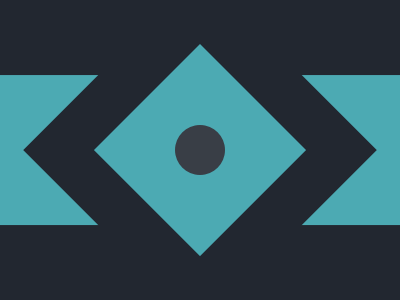
## Solution
So now look at the Solution and how we are going to achieve this.
%[https://youtu.be/sXfOKCzN_D8]
### HTML
```html
```
### CSS
Now let's style the containers.
```css
body {
margin: 0;
background: #222730;
display: grid;
place-items: center;
}
.rect {
width: 100%;
height: 150px;
background: #4caab3;
}
.square {
position: absolute;
width: 150px;
height: 150px;
background: #4caab3;
transform: rotate(45deg);
box-shadow: 0 0 0 50px #222730;
}
.circle {
position: absolute;
width: 50px;
height: 50px;
background: #393e46;
border-radius: 50px;
}
```
>*Note: In CSS Battle you can use `100` instead of `100px`. You don't need to define `px` in CSS. However, if you are using `rem` or `%`, you need to pass them separately. That's why in the above CSS code there are no units mostly. For more info [visit here](https://cssbattle.dev/tips)*
>*Minify the code or CSS by using any [CSS Minifier](https://www.minifier.org/). It helps you to reduce the characters in the code which will increase the score.*
**Minified Version:**
```