# CSS Battle: #4 - Ups n Downs
In this article, I will solve a [Ups n Downs](https://cssbattle.dev/play/4) CSS Challenge on [CSS Battle](https://cssbattle.dev/). Let's look at the [problem](https://cssbattle.dev/play/4) first.
## Problem
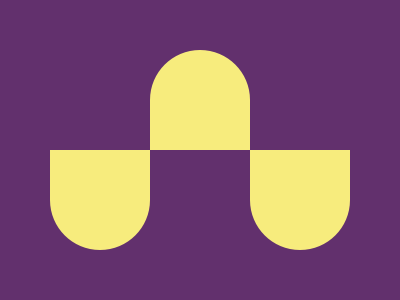
We need to create the following container by using CSS Properties only:
## Solution
So now look at the Solution and how we are going to achieve this.
### HTML
```html
```
### CSS
Now let's style the containers.
```css
body {
margin: 0;
background: #62306d;
}
.middle,
.left,
.right {
position: absolute;
background: #f7ec7d;
width: 100;
height: 100;
border-radius: 10rem 10rem 0 0;
margin-top: 50;
}
.middle {
left: 150;
}
.left,
.right {
transform: rotate(180deg);
bottom: 34;
}
.left {
left: 50;
}
.right {
right: 50;
}
```
>In CSS Battle you can use `100` instead of `100px`. You don't need to define `px` in CSS. However, if you are using `rem` or `%` then you need to pass them separately. That's why in the above CSS code there are no units mostly. For more info [visit here](https://cssbattle.dev/tips)
## Codepen
%[https://codepen.io/j471n/pen/NWjrqNL]
## Alternate Solution
There could be many Alternative Solutions I've used this one because of the fewer characters and simplicity.
### HTML
```html
```
Here I am using `` tag and inside them `l` stands for `left`, `m` stands for `middle` and `r` stands for `right`.
### CSS
```css
body{
margin:0;
background:#62306D;
}
p[m],p[l],p[r]{
position:absolute;
background:#F7EC7D;
width:100;
height:100;
border-radius:10rem 10rem 0 0;
margin-top:50;
}
p[m]{
left:150;
}
p[l],p[r]{
transform:rotate(180deg);
bottom:34;
}
p[l]{
left:50;
}
p[r]{
right:50;
}
```
>Minify the code or CSS by using any [CSS Minifier](https://www.minifier.org/). It helps you to reduce the characters in the code that will increase the score.
## Wrapping up
If you like this then don't forget to ❤️ it. And I'll see you in the next article. See you soon.